
What Is a Video Doorbell and How Does It Work?
A Video Doorbell is more than a camera beside a front door. It combines a wide-angle lens, motion sensors, a microphone, a speaker, and an internet connection. When someone approaches, the device can send an alert to a smartphone. Some models also record video, support two-way conversation, and identify familiar faces.
Market data shows why this small device matters. Parks Associates reported that roughly one in five United States broadband households owned a video doorbell in recent research. Grand View Research also identifies smart doorbells as a growing market, driven by connected-home adoption and demand for remote monitoring. These figures suggest strong interest, but they do not prove that every product improves security equally. Installation quality, battery life, privacy settings, and network reliability still matter.
Jamie Siminoff, Ring’s founder, explained the original idea this way: “I wanted to be able to answer my door from anywhere.” That sentence captures the basic appeal. A visitor presses the button, the camera captures movement, and cloud software may deliver the footage within seconds. The experience can feel almost immediate. It is not always immediate.
This guide explains what happens inside a Video Doorbell, from motion detection to smartphone alerts. It also examines wired and battery-powered designs, night vision, storage choices, and privacy controls. A clear understanding helps buyers look beyond polished advertisements. The smallest details, such as a weak Wi-Fi signal or a poorly angled camera, can change the whole experience.
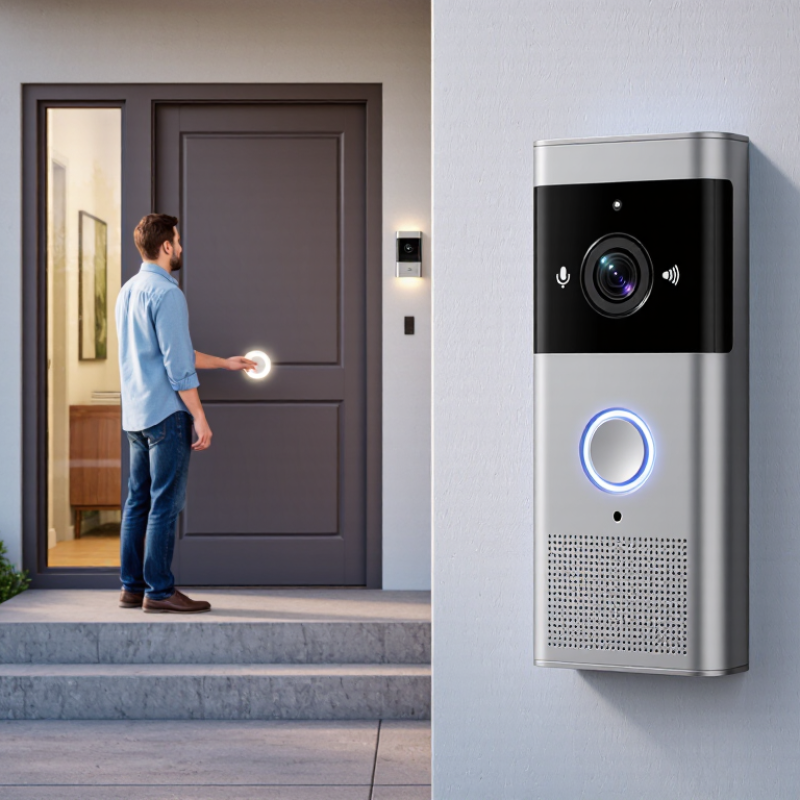
What Is a Video Doorbell?
What Is a Video Doorbell?
A video doorbell is a small security device placed beside an entrance. It combines a doorbell button, camera, microphone, speaker, and motion sensor. When someone approaches, the camera can record activity and send an alert to a connected phone. The homeowner may then view live video, speak through the device, or check a saved clip.
Most models use a wired power connection or a rechargeable battery. Their camera captures images through a wide-angle lens, often during the day and at night. Infrared lighting helps create clearer footage in darkness. Many devices connect to a home network, allowing remote access through an application. A stable connection matters. Weak signals can cause delays, missing clips, or frozen video.
In practical use, a video doorbell can help identify visitors, deliveries, and unexpected movement. Two-way audio also allows communication without opening the door. However, it is not a perfect security tool. Bright sunlight, heavy rain, poor positioning, or a low battery can reduce performance. Privacy settings should be reviewed carefully, especially when cameras face shared walkways. Clear recordings are useful, but they should not replace sensible lighting, strong locks, and careful judgment. Motion alerts can also become annoying when pets, trees, or passing cars trigger them repeatedly. That small inconvenience is easy to underestimate.
What Is a Video Doorbell and How Does It Work? - What Is a Video Doorbell?
| Data Dimension | How It Works | Typical Information | Practical Consideration |
|---|---|---|---|
| Definition | A video doorbell is a connected doorbell with a camera, microphone, speaker, and motion-sensing functions. | It can show who is at the door and support two-way communication. | It supplements, rather than automatically replaces, a traditional doorbell or home security system. |
| Doorbell Activation | Pressing the doorbell button sends an event notification to the connected system. | The event may trigger a chime, smartphone alert, live video, or recording. | The response depends on the device settings, internet connection, and account configuration. |
| Camera Function | The camera captures a live view of the area in front of the entrance. | Common features include wide-angle viewing, automatic exposure, and image capture. | Actual visibility can be affected by mounting height, viewing angle, lighting, and obstructions. |
| Video Resolution | The camera converts visual details into a digital video stream. | Common consumer resolutions range from approximately 720p to 2K, depending on the model. | Higher resolution can improve detail but may require more storage, bandwidth, and processing power. |
| Night Vision | Infrared light or low-light image processing helps the camera record when visible light is limited. | Night footage is often displayed in grayscale when infrared illumination is active. | Bright lights, reflective surfaces, rain, and darkness beyond the camera’s range may reduce image quality. |
| Motion Detection | Sensors and software identify movement within selected areas and can create alerts. | Detection zones, sensitivity controls, and event schedules are commonly available. | Vehicles, animals, shadows, weather, and passing pedestrians can cause unwanted notifications. |
| Audio Communication | A built-in microphone receives sound while a speaker transmits the user’s voice. | Two-way talk allows a resident to communicate with a visitor through an app. | Audio clarity depends on wind, traffic, distance, network delay, and background noise. |
| Internet Connection | The doorbell usually connects through a home wireless network and exchanges data with an app or online service. | Remote viewing and alerts generally require a functioning internet connection. | A weak connection can cause delayed notifications, interrupted video, or unavailable remote access. |
| Power Source | Devices may receive power from existing doorbell wiring or from a rechargeable battery. | Wired units can operate continuously; battery units require periodic charging. | Battery life varies with temperature, motion frequency, video quality, and live-view usage. |
| Video Storage | Recorded clips may be saved locally, on removable storage, or on a remote online service. | Storage duration depends on recording length, resolution, available capacity, and retention settings. | Online storage may require an account or paid plan, while local storage requires compatible hardware and management. |
| Mobile Notifications | The system sends an alert when a configured event occurs. | Notifications may include a timestamp, event type, thumbnail, or direct access to live video. | Phone permissions, app settings, mobile data, and internet availability affect delivery. |
| Smart Detection | Software may analyze video to distinguish categories of movement. | Possible categories include people, packages, animals, or general motion, depending on the device. | Automated classifications are not guaranteed to be accurate in every lighting or weather condition. |
| Installation | The unit is mounted near the entrance and aligned to cover the desired approach area. | Installation may involve screws, a mounting bracket, wiring, and network configuration. | Electrical work should follow local regulations and may require a qualified professional. |
| Weather Resistance | Outdoor-rated housings protect internal components from specified environmental exposure. | Weather protection is commonly described by an ingress-protection rating or manufacturer specifications. | The rating does not mean the device is immune to extreme heat, freezing temperatures, flooding, or physical damage. |
| Privacy and Security | Video and audio can be protected through account controls, encryption, access permissions, and privacy settings. | Useful controls may include activity zones, audio disablement, user management, and data-retention options. | Users should position the camera responsibly, use strong passwords, enable multi-factor authentication when available, and follow local privacy laws. |